跳至产品信息
1 / 4

Cockpit Simulator

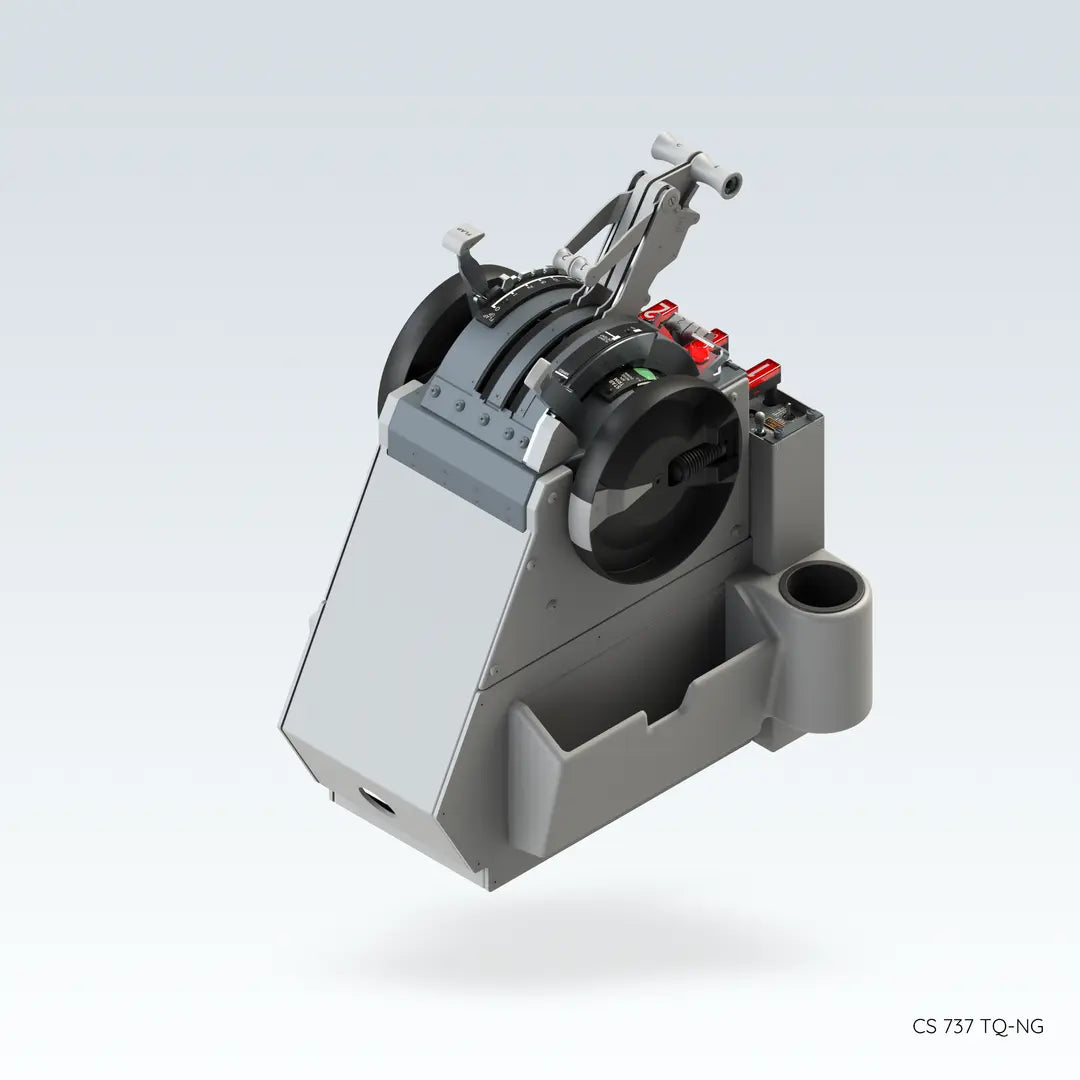
CS 737TQ + TQ Base with Fire Protection Panel

CS 737TQ + TQ Base with Fire Protection Panel

常规价格 $4,199.00 USD
常规价格 促销价 $4,199.00 USD
促销 售罄

The CS 737 TQ-NG/CS 737 TQ-MAX is a fully functional throttle quadrant designed for 737NG/737MAX flight simulator cockpits. Constructed with a high-precision, all-metal main structure, it features true-to-scale panel dimensions with backlit engravings. At its heart, 4 high-torque brushless motors and 5 stepper motors power the motorized operation of thrust levers, speed brakes, trim wheels, and more, ensuring automatic synchronization with your simulation software. Key features include motorized synchronous forward/reverse thrust levers (with a mechanical interlock), auto spoiler deployment, an electric trim system, and a simulated base complete with document holders, cup holders, and a fully functional fire warning panel. Emulating the 737NG/737MAX style for start levers and parking brake switches, the CS 737 TQ-NG/CS 737 TQ-MAX delivers an unparalleled level of realism for simulation enthusiasts.

Select Variant
数量
查看完整详细信息

CS 737X TQ — Motorized Throttle Quadrant for 737NG/737MAX Flight Simulator Cockpits

The CS 737 TQ-NG/CS 737 TQ-MAX is a fully functional throttle quadrant designed for 737NG/737MAX flight simulator cockpits. Constructed with a high-precision, all-metal main structure, it features true-to-scale panel dimensions with backlit engravings. At its heart, 4 high-torque brushless motors and 5 stepper motors power the motorized operation of thrust levers, speed brakes, trim wheels, and more, ensuring automatic synchronization with your simulation software. Key features include motorized synchronous forward/reverse thrust levers (with a mechanical interlock), auto spoiler deployment, an electric trim system, and a simulated base complete with document holders, cup holders, and a fully functional fire warning panel. Emulating the 737NG/737MAX style for start levers and parking brake switches, the CS 737 TQ-NG/CS 737 TQ-MAX delivers an unparalleled level of realism for simulation enthusiasts.

Key Features

  • ✓ Motorized Synchronous Throttle Levers
  • ✓ Reverse Thrust Interlock Mechanism
  • ✓ Electric Trim System
  • ✓ Backlit Control Panel with adjustable brightness
  • ✓ Auto Spoiler Deployment
  • ✓ Professional-Grade Authenticity
  • ✓ Optional Simulated Pedestal Base with Fire Warning Panel

Material

The main body is made of full metal construction. The panel is engraved with backlighting, and supports synchronized adjustment of backlight brightness within the simulation software.

Motors

Equipped with 4 high-power, high-efficiency brushless motors and 5 stepper motors, which respectively drive the thrust levers, throttle quadrant, trim wheel, flaps lever, and speed brake lever. These components automatically synchronize with the in-software status and positioning of the simulation program.

Throttle Control Levers

Forward thrust levers move in real-time synchronization with the auto-throttle system and support manual override. Reverse thrust levers feature a built-in mechanical interlock.

Speed Brake Lever

Offers auto deployment upon landing and interaction with reverse thrust levers, and auto retraction when forward thrust is advanced. Includes a flight detent lock.

Trim and Flap System

Electrically driven trim wheel with adjustable rotation speed and foldable handles for manual override. Flap lever includes 9 detent slots, replicating real aircraft operation.

Optional Simulated Pedestal Base

Includes document holders, cup holders, and a fully functional Overheat and Fire Warning Panel.


No Settings Required — Simple Plug-and-Play Bridge Software

Automatic Detection and Configuration

The CockpitSimulator Bridge software is easy to use. Ensure all flight simulator applications are closed, then open the CS Bridge software. It will automatically detect your installed simulation platforms and supported aircraft, and write the necessary configuration parameters. After setup, connect your device using the provided USB cable and the included 24V power adapter. CS Bridge also provides hardware testing and over-the-air firmware update functionality.


Connection Modes

Standard Connection (USB Mode)

For individual use, follow these simple steps for a plug-and-play experience:

  • Power Up: Connect the included 24V, 5A AC/DC power adapter to the device’s DC input port.
  • Connect to PC: Use the provided USB Type-C cable to connect the device to an available USB port on your computer.

This connection ensures full functionality, including throttle lever calibration, autothrottle (A/T) servo operation, and panel backlighting.

Powered USB HUB Mode

If you are connecting multiple cockpit devices and your computer’s USB ports are insufficient, you can use a powered USB hub. The hub manages data connectivity — each Cockpit Simulator device (including this Throttle Quadrant) must still be individually powered via its own DC power adapter.

Questions about installation or compatibility? Contact us anytime — we’re here to help.


Dimensions

CS 737 TQ Vertical View

CS 737X TQ Vertical View Dimensions

CS 737 TQ Side View

CS 737X TQ Side View Dimensions

CS 737 TQ Rear View

CS 737X TQ Rear View Dimensions

CS 737 TQ Mounting Holes

CS 737X TQ Mounting Holes

Package Contents

  • 1× Quick Start Guide
  • 1× 1.5m USB Type-A to Type-C cable
  • 1× AC/DC switching adapter (Input: AC 100–240V~, 50/60Hz; Output: DC 24V, 5A)
  • 3× AC power cord (CEE-7 3-pin; NEMA 5-15P 3-pin; Type I 3-pin)
  • 1× CS 737X Throttle Quadrant device

Connectors & Power Input

  • 1× USB 2.0 Type-C port
  • 1× DC 5.5mm × 2.1mm power input (DC 24V, 5A)
CS 737X TQ Connection Port

Product Dimensions & Weight

  • Width: 494mm  
  • Depth: 542.8mm  
  • Height: 680.4mm  
  • Weight: 27.3 kg

Package dimensions & Weight

  • Width: 480mm
  • Depth: 670mm
  • Height: 880mm
  • Weight: 40 kg

Warranty Policy

System Requirements

Windows 10 (64-bit) or later

Interface: USB 2.0 port

Storage: 50MB disk space

AIRCRAFT ADDON SUPPORT LIST

ProSim

ProSim737

(with bridge software v2026.1.0 and later)

(requires ProSim737 version 3.35 and above)

Microsoft Flight Simulator 2024

PMDG 737 for MSFS 2024

(with bridge software v2026.1.0 and later)

(including but not limited to: -600, -700, -800, -900, …)

iFly 737 MAX8 for MSFS 2024

(with bridge software v2026.1.0 and later)

(requires iFly version 1.0.4.3 for autothrottle servo following function to work properly)

Microsoft Flight Simulator (2020)

PMDG 737 for MSFS

(with bridge software v2026.1.0 and later)

(including but not limited to: -600, -700, -800, -900, …)

iFly 737 MAX8 for MSFS

(with bridge software v2026.1.0 and later)

(requires iFly version 1.0.4.2 for autothrottle servo following function to work properly)

X-Plane (11 / 12)

B737-800X ZIBO mod

(with bridge software v2026.1.0 and later)

(manual trim wheel input function is temporarily unavailable)

Threshold LevelUp 737NG

(with bridge software v2026.1.0 and later)

(manual trim wheel input function is temporarily unavailable)

Prepar3D (v4 to v5)

PMDG 737NGXu

(with bridge software v2026.1.0 and later)

About Cockpit Simulator

The members of Cockpit Simulator come from all over the world, and the core designers have work experience in professional avionics companies, full flight simulator companies, aircraft maintenance engineering companies, and well-known software companies. At the same time, we are also flight simulation enthusiasts.

We are dedicated to making the most realistic simulation equipment for flight simulation enthusiasts. The feature of our products is infinitely closer to the functionality and feel of a real aircraft and at a low price.

We will complete each module of the cockpit step by step, so that every flight simulation enthusiast can build a flight simulator at home.

We will focus on product strength and continue to achieve excellent quality to provide top flight simulation products for flight enthusiasts and pilots.

Warranty

1. Warranty Period
This product is covered by a two-year warranty starting from the actual date of purchase by the customer.
The warranty period shall be determined based on a valid proof of purchase provided by the customer (such as an invoice, order record), using the purchase date shown on the document.

2. Warranty Coverage
During the warranty period, after-sales service will be provided if the product experiences any of the following issues under normal use:

  • Performance failure or quality issues caused by non-human factors;
  • Issues that are confirmed by our after-sales inspection to be inherent product quality defects.

The following situations are not covered by the warranty:

  • Damage caused by human factors, including but not limited to dropping, water damage, unauthorized disassembly, modification, or alteration;
  • Malfunctions caused by improper use or failure to follow the product user manual;
  • Damage caused by force majeure events, such as fire, lightning, floods, or other natural disasters;
  • Products that have exceeded the warranty period;
  • Cases where valid proof of purchase cannot be provided or the purchase information cannot be verified.

3. After-Sales Service Method

  • For products that meet the warranty conditions within the warranty period, replacement service will be provided in principle;
  • The replacement product will be of the same model. If the original model is discontinued or out of stock, a replacement with equal or higher performance will be provided.

4. After-Sales Service Procedure (Important)​
To ensure fairness and standardization of after-sales service, the replacement process is as follows and is effective immediately:

4.1 After-Sales Request
Customers must contact our official after-sales email and provide the following information:

  • Description of the product issue;
  • Valid proof of purchase (invoice, order record, etc.);
  • Contact information and delivery address (including full name, phone number, and email address).

4.2 Return of the Defective Product
Customers must return the defective product to the address designated by our company according to the after-sales instructions;
If the defective product is not returned, the company will no longer provide advance replacement service.

4.3 Product Inspection
Upon receipt of the returned product, our company will conduct inspection and verification.

4.4 Replacement Shipment

  • If the inspection confirms that the issue falls within the warranty coverage, a new replacement product will be shipped after the inspection is completed;
  • If the product does not meet the warranty conditions, the customer will be contacted to discuss further solutions, such as paid repair or replacement.

5. Shipping Cost Policy

  • Return shipping of the defective product: In principle, the cost shall be borne by the customer;
  • Shipping of the replacement product: The cost shall be borne by our company.

6. Customs Duties and Taxes Policy

  • Customs duties and taxes for returning the defective product: Any customs duties, import taxes, or related charges incurred when returning the defective product shall be borne by our company.
  • Customs duties and taxes for shipping the replacement product: Any customs duties, import taxes, or related charges incurred when shipping the replacement product shall be borne by the customer.

7. Method of Warranty

  • To submit a Warranty claim, contact CS Technical Support (“CS Support”) via email at info@flylanta.com.